About Me

My photo
Colombo, Sri Lanka
Professional Report/ Technical/ Blog/ Academic and Ghost Article Writer,Application Developer, Database Administrator, Content Creator and Project Manager in a wide variety of business & enterprise applications. Particularly interested in client/server and relational database design using MS-SQL Server & Oracle. Always interested in new hi-tech projects, as well as close interaction with the DB querying & reporting. Also a specialist in Education Management. Actively seeking the processes for merging Enterprise Lean Sigma (ELS) with IT.

Sunday, 9 January 2011

MyFord Mobile smartphone app

Ford's new MyFord Mobile app will let owners of the Focus electric car get a variety of telematics functions, from the basic, such as remote door unlock, to trip planning software that takes the car's remaining range into account.


MyFord Mobile includes smart charging settings. Ford worked with Microsoft to develop a system that takes advantage of low electricity rates. The system asks owners when they expect to need the car, then picks a period of time when electricity is cheap to charge up the batteries.


MyFord Mobile uses MapQuest to find charging stations. It shows the car's current location and nearby charging stations. It also indicates which charging stations are in range.

The trip planning feature lets drivers enter multiple destinations, indicating if the car has enough range to reach all of them. Drivers can decide on different routes based on how much range the car has left.

The app gives tips to help drivers maximize their range. For example, it checks the outside temperature and suggests pre-heating or running the air conditioning while the car is plugged in, so the climate control system does not impact range as much. 


Thursday, 6 January 2011

The symbol of the rivalry: Steve Jobs and Bill Gates

Microsoft versus Apple has long been the marquee rivalry of the technology industry, 
but the two companies also have a long history as frenemies. Here are their 10 greatest collaborations.

10. Microsoft launches Outlook for Mac in Office 2011

9. Apple and Microsoft spurn Blu-ray for digital downloads
8. Apple makes Safari available for Windows

7. Snow Leopard connects to Exchange

6. Boot Camp installs Windows on Mac hardware


5. Microsoft licenses Exchange Activesync for iPhone
4. Microsoft invests $150 million in Apple

3. Internet Explorer becomes the default browser on Mac

2. Apple makes iPod compatible with Windows
1. Microsoft develops Word for the original Macintosh


Wednesday, 5 January 2011

10 ways to become an IT superstar

You have long years of experience in the IT field and you really know your stuff. But when you go to conferences or offer to speak to local user groups, nobody knows your name and you can’t command the high salary scale that others are offering. Go through some of the below points and you'll be a different person after doing so.

1: Gain experience

Even though IT experience isn’t enough to get you recognized as an expert in an industry that’s filled with experienced IT pros, it is the first prerequisite. No matter how brilliant you are, regardless of the fact that you were building your own circuit boards as a kid and made straight A’s in comp sci, real-world experience still counts. You probably won’t begin to be taken seriously until you’ve been working in the real world in some capacity for at least five years (10 is better).

2: Concentrate on a specialty
The IT field has grown to the point where, as with the medical field, it’s impossible for one person to master all of it. If you try to be a jack of all trades, you’ll probably never become enough of an expert in anything to stand out from the crowd. Sure, it’s possible to be an IT generalist, but the quickest route to “fame” (and some measure of fortune) is to find yourself a niche.


3: Take ownership
Once you’ve decided on an area of expertise, your goal should be to take ownership of that particular product or topic area. You want to become the person whom everyone thinks of when they think about that topic. For example if you want to develop windows applications, you got to give in that etra bit of spice to your application to stand out from rest of the crowd.


4: Start small
No matter how ambitious your ultimate goal is, you’re more likely to attain it if you’re willing to start small and get there in increments. Begin by becoming well known and respected in one particular venue — such as on a particular Web forum or within a local IT user group. Hone your leadership skills and become a big fish in these small ponds, and that will lead to opportunities to swim in much bigger waters.


5: Take on writing assignments
Not everyone has the time, interest, and stamina to write a book. It’s a lot of hard work. Sometimes it pays off handsomely but other times the earnings, given the hours you put in, don’t even add up to minimum wage. An easier way to make money writing about IT is to produce 500- to 2,500-word articles for IT webzines. There are thousands of forums, blogs and online tech wrting sites you can register and master your skill.


6: Put your name on the Web
Even if you haven’t yet reached the point where people are willing to pay you to write about IT, you can get your name out there: Put it on the Web. Create an IT-oriented Web site with your name prominently featured. It can be a help forum, where you answer questions and solve IT problems. It can be a gathering place for other IT pros to post on a Web board and do much of the problem solving. It can be just an ad for your consulting business or a showplace for you to brag about your awards (if you do it in the right way). The important thing is to get your name “up in lights.”


7: Get social
Don’t get so busy building your business that you forget the importance of socializing. That includes both real-world and online social networking. Join LinkedIn and Facebook and set up a Twitter account, and use them to further your career ambitions. The beautiful thing about the Internet is that “nobody knows you’re a dog.” Looks, race, gender, disabilities, etc., don’t matter. It is entirely possible to build a strong reputation and make a good living doing everything online.
Seek out other IT pros as friends and followers and post with your business reputation in mind. Post tidbits of IT news, links to helpful IT articles, and of course, links to any of your articles, blog posts, etc. As with blogging, if you want to use social networking sites for more personal purposes, set up two separate accounts — one for business friends and one for personal friends.


9: Seek out other superstars
When you’re socializing, whether online or at real-world events, hang out with the other superstars if you can. I don’t mean you should push your way into the inner circle, but you shouldn’t be shy about approaching the IT gurus you admire and letting them know how they’ve inspired you. Especially as you begin to be known for your own expertise, most of them will be happy to be contacted by you.


10: Talk the talk
Writing will get you name recognition, but to get face recognition, you need to do more. Real-life meetings and conferences will do that, to a degree. But it you really want to be a superstar, you shouldn’t be just attending those conferences; you should be presenting at them. They say public speaking is the number one fear, even above death — but it’s a fear that anyone can get over with a lot of practice. 

Monday, 3 January 2011

Arrival of my new phone in 2011...an Android Phone

The sexy new MOTOROLA XT5 is more than just a business tool. With its powerful Android platform, WiFi capability, full HTML browser, and a 5.0 MP camera with LED flash, you can have lots of excitement, anytime.

Key Features
-Full HTML Browser
-Android Eclair
-Google Webkit
-Large 3.2 HVGA Tochscreen display
-5.0 Megapixel camera with Android Flash

3G
WCDMA 850/1900/2100, GSM 850/900/1800/1900, HSDPA 7.2 Mbps (Category 7/8), EDGE Class 12

ANDROID OPERATING SYSTEM
Éclair 2.1

TOUCH TABLET
Touch Tablet

CAMERA
MEGA-PIXELS
5 MP
DIGITAL ZOOM
FLASH
LED
FOCUS
Fixed

MUSIC ENABLED MUSIC PLAYER
android media player VIDEO CAPABLE

VIDEO CAPTURE PLAYABLE FORMATS
H.263, H.264, MP3, MPEG-4, WAV, AAC, AAC+, MIDI, AMR NB
DivX
STREAMING MEDIA
Video
VIDEO PLAYER
Video Capture, Playback and Streaming

USAGE TIME (CONTINUOUS)1
GSM: up to 6.5 hours WCDMA: up to 5.7 hours
BATTERY TYPE
1270 mAh Li-Ion
STANDBY TIME
GSM: up to 230 hours WCDMA: up to 319 hours


EMAIL
POP3/IMAP embedded, Google Mail
MULTIMEDIA MESSAGING (MMS)4
MMS
TEXT MESSAGING (SMS)3
SMS

WEB BROWSER
BLUETOOTH® Version 2.0 + EDR

WIFI
802.11g

CONNECTOR TYPE
Micro USB
DATA TRANSMISSION RATE
HSDPA 7.2 Mbps (Category 7/8), EDGE Class 12

GPS AND LOCATION SERVICES
aGPS
HEADSET JACK
3.5mm

PHONE BOOK
Back to top

NAVIGATION TOOL
roller nav disc
OPERATING SYSTEM
Éclair 2.1
TOUCH SCREEN

ANDROID MARKET™

DISPLAY TYPE
262k TFT
DISPLAY SIZE
3.2 inches, 480x320 HVGA
WEIGHT
142.5 g
SIZE
56.8 x 114.9 x 12.5
ANTENNA TYPE
Internal
FORM FACTOR
Touch Tablet

TOOLS
CALCULATOR
CLOCK

NETWORKS
WCDMA 850/1900/2100, GSM 850/900/1800/1900, HSDPA 7.2 Mbps (Category 7/8), EDGE Class 12, aGPS

SENSORS
magnometer, proximity sensor,accelerometer


Friday, 31 December 2010

'World's first 3D website' launched

British company Stereografix have launched what they claim to be the 'world's first 3D website'.But before users log on they will need a 3DTV, compatible browser and a pair of 3D glasses to enjoy the experience.

Stereografix Founder, Saif Chaudry, said that many people aren't thinking this far ahead adding that 'It's not every day you can say you're first with something where the internet is concerned'.
However, there has been some debate over whether the website's claims are true.

Google's Youtube has been offering 3D content for some time now, but the Stereografix site goes one step further with a 3D interface as well as additional content.

Mr Chaudry concluded that he thinks there needs to be 'a lot more 3D TVs and computer monitors out there before it becomes mainstream, but people aren't just going to go out and buy these things unless they've got something to show on them'.


*Source & courtesy: BCS-Chartered Institute for ITADNFCR-2575-ID-19950246-ADNFCR

Wednesday, 29 December 2010

The most distant man-made object from Earth


As NASA's robotic space probe Voyager 1 prepared for launch in August of 1977 on a mission to locate and study the boundaries of our solar system, researchers could only imagined the scope of the project's success.Moving at a speed of 10.5 miles per second, the equivalent of more than 38,000 miles per hour, Voyager 1 is now the most distant man-made object from Earth, and last week, after a 33-year journey, it has reached the outer limits of our solar system.
In a series of messages and sounds of Earth intended as greetings for any extraterrestrial beings the spacecraft might encounter during its decades-long sojourn through outer space, NASA launched Voyager carrying 12-inch gold-plated copper discs.Containing greetings in 60 languages with samples of music and natural sounds of Earth's natural world, technician John Casani displays the "Sounds of Earth" recording before its installation on the Voyager spacecraft.
Voyager 1 captured this iconic image of a crescent-shaped Earth and moon on September 18, 1977. This was the first time Earth and its moon were photographed together in a single image, captured by Voyager 1 when it was 7.25 million miles from Earth.
By February 1990, when these images were taken, Voyager 1 was farther from the sun than Pluto, and approximately 4 billion miles from Earth. These pictures were the first ever taken of our solar system's planets from beyond their orbit.
One of the most famous images ever snapped by Voyager 1, taken on June 6, 1990, was dubbed the "pale blue dot," depicting Earth on a scale never before seen. Of the "pale blue dot," astronomer Carl Sagan said:
"That's here. That's home. That's us. On it everyone you love, everyone you know, everyone you ever heard of, every human being who ever was, lived out their lives. The aggregate of our joy and suffering, thousands of confident religions, ideologies, and economic doctrines, every hunter and forager, every hero and coward, every creator and destroyer of civilization, every king and peasant, every young couple in love, every mother and father, hopeful child, inventor and explorer, every teacher of morals, every corrupt politician, every 'superstar,' every 'supreme leader,' every saint and sinner in the history of our species lived there--on a mote of dust suspended in a sunbeam."

A picture of Jupiter's Great Red Spot taken by Voyager 1 in February 1979.

From Voyager's great distance, more than 4 billion miles from Earth, our planet is a mere point of light. Look closely for the tiny white speck in the right-most strip of color: that's us !!! 

Monday, 27 December 2010

Implementing SQL Server Database Mail

Have you ever wished your database could tell you what's wrong or let you know when a task has completed? SQL Server's Database Mail allows the database to send out messages over SMTP. I will show you how to set up Database Mail and send some messages.

Introduction to Database Mail

Have you ever wished your database could talk to you, to tell you what's wrong or let you know when a task has completed? I certainly have. Fortunately, SQL Server comes equipped with a utility for just such a task. SQL Server's Database Mail allows the database to send out messages over SMTP. Let's have a look at setting it up and sending some messages.

Overview of Database Mail

Database Mail is a robust SQL Server utility for enabling email from your database. Email messages can be sent to multiple recipients, with multiple attachments. You can even include a query to be executed and the results attached to or included in the email.

The beauty is it doesn't require an extended MAPI (Messaging Application Programming Interface) client to be installed on the SQL Server. All you need is an SMTP (Simple Mail Transfer Protocol) server. Multiple SMTP servers can be utilized for resilience.

The utility is enterprise-ready. Database Mail is cluster aware. It provides for redundancy in profiles, accounts, and SMTP servers supporting both failover and distribution of load. It performs asynchronously, queuing up messages via Service Broker, allowing for decoupling from the email transport mechanism.
Copies of the emails and attachments are retained in the MSDB database and usage is logged in the database as well as the event log. This allows for auditing and support of Database Mail.
To provide security around Database Mail, users must be granted rights to the profiles used by Database Mail (though they could be granted to public if you choose). Also, the account executing it must be a member of the DatabaseMailUserRole in the MSDB database.
Additional security is provided with regards to attachments. Database Mail can be configured to limit the size of email attachments as well as the allowable attachment extensions.

Database Mail Installation and Configuration

To prepare for Database Mail, you will need to determine what SMTP server you want to utilize as well as the account that will be sending the email. Additionally, the SMTP server will need to allow communication from the SQL Server server and the account will need to be granted rights to send mail. SQL Server can connect to the SMTP server using SSL (if required), anonymous access (if allowed), or basic authentication.
Consideration must be given to the amount of traffic Database Mail will be generating through your solution and if the selected SMTP server can handle the additional traffic. Once the traffic volume is understood, you can estimate any growth impact on MSDB, which serves as a repository for outgoing email messages and logs.
To control the growth of MSDB, clean up tasks can be scheduled to delete messages and/or clean up the log. System stored procedures sysmail_delete_mailitems_sp and sysmail_delete_log_sp are provided to assist with these tasks.
Database Mail, which runs in MSDB, relies on SQL Server Service Broker under the covers. By default, Service Broker is enabled in MSDB. If it is not enabled in your MSDB, you will need to enable it. This requires a database lock, which will require SQL Agent to be stopped.
Once SMTP and Service Broker are configured, Database Mail can be enabled on your SQL Server instance. First, make sure the sending account is a member of the DatabaseMailUserRole database role in the MSDB system database. Then, while in SQL Server Management Studio, expand your connection to the instance. Navigate to Management and right-click on Database Mail. Choose Configure Database Mail to kick off the Database Mail Configuration Wizard. Alternatively, you can use sp_configure to enable Database Mail. Let's walk through the Configuration Wizard screens.
Select the "Set up Database Mail by performing the following tasks" option in the Configuration Wizard and answer "Yes" to enable Database Mail.

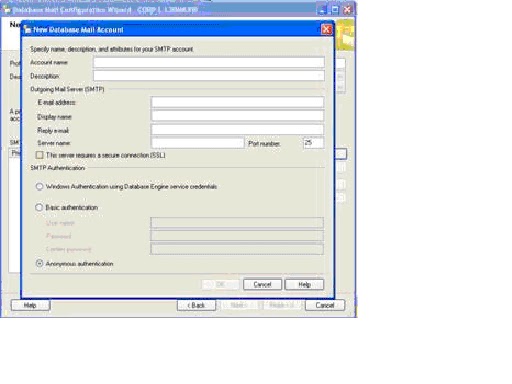
After naming the profile, add the account or accounts the profile should use to send mail. The accounts will be used in order should there be a problem with one or more of them. Here you will also set your authentication mode to the SMTP server.

On this screen, you can specify access to the profiles as appropriate.
Finally, you can specify characteristics of Database Mail such as the retry count, maximum file sizes, prohibited attachment extensions, and the logging level.

Review the summary and click finish. You're ready to send mail.

Examples of Utilizing Database Mail

Now that Database Mail is set up on your SQL Server instance, let's look at a couple examples of utilizing Database Mail.
The following example shows a simple call to the sp_send_dbmail stored procedure. You could put a call like this at the end of an application stored procedure or SQL job to alert on success or failure of the processing for instance.
    EXEC msdb.dbo.sp_send_dbmail
         @profile_name = 'DBMail'
       , @recipients =  'GroupSQLDBA@MyCo.com'
       , @copy_recipients = 'GroupAppSupport@MyCo.com'
       , @from_address = 'DBMail@MyCo.com'
       , @subject = 'Success'
       , @body = 'SQL Job xyz completed successfully';
A more sophisticated example would be executing a query and including the result set as an attachment to the email. Let say you've been concerned with excessive locking in your database, but can't spend all day looking at the locking reports to see when excessive lock waits are occurring. So, you set up a job that runs every 15 minutes and sends you the latest information on all exclusive and intent exclusive locks for instance.
EXEC msdb.dbo.sp_send_dbmail
     @profile_name = 'DBMail'
    ,@recipients = 'GroupSQLDBA@MyCo.com'
    ,@from_address = 'DBMail@MyCo.com'
    ,@query = 'SELECT resource_type, resource_database_id, 
               request_mode, request_session_id 
               FROM sys.dm_tran_locks
               WHERE request_mode IN (''IX'', ''X'')' 
    ,@subject = 'Exclusive Locks'
    ,@attach_query_result_as_file = 1 ;
 
When this executes, the query will be run and the result set will be added as an attachment to the email message. Now you can look through your emails for trends in locking in one or more of your databases and investigate further if need be.

Conclusion

Whether for administration or business application, Database Mail is an easy and convenient way to add communication to your SQL processes. With consideration for reliability, security, scalability, and supportability, this solution can be used in shops small and large including those running SQL clusters.

LinkWithin

Related Posts Plugin for WordPress, Blogger...