About Me

My photo
Colombo, Sri Lanka
Professional Report/ Technical/ Blog/ Academic and Ghost Article Writer,Application Developer, Database Administrator, Content Creator and Project Manager in a wide variety of business & enterprise applications. Particularly interested in client/server and relational database design using MS-SQL Server & Oracle. Always interested in new hi-tech projects, as well as close interaction with the DB querying & reporting. Also a specialist in Education Management. Actively seeking the processes for merging Enterprise Lean Sigma (ELS) with IT.

Wednesday, 29 December 2010

The most distant man-made object from Earth


As NASA's robotic space probe Voyager 1 prepared for launch in August of 1977 on a mission to locate and study the boundaries of our solar system, researchers could only imagined the scope of the project's success.Moving at a speed of 10.5 miles per second, the equivalent of more than 38,000 miles per hour, Voyager 1 is now the most distant man-made object from Earth, and last week, after a 33-year journey, it has reached the outer limits of our solar system.
In a series of messages and sounds of Earth intended as greetings for any extraterrestrial beings the spacecraft might encounter during its decades-long sojourn through outer space, NASA launched Voyager carrying 12-inch gold-plated copper discs.Containing greetings in 60 languages with samples of music and natural sounds of Earth's natural world, technician John Casani displays the "Sounds of Earth" recording before its installation on the Voyager spacecraft.
Voyager 1 captured this iconic image of a crescent-shaped Earth and moon on September 18, 1977. This was the first time Earth and its moon were photographed together in a single image, captured by Voyager 1 when it was 7.25 million miles from Earth.
By February 1990, when these images were taken, Voyager 1 was farther from the sun than Pluto, and approximately 4 billion miles from Earth. These pictures were the first ever taken of our solar system's planets from beyond their orbit.
One of the most famous images ever snapped by Voyager 1, taken on June 6, 1990, was dubbed the "pale blue dot," depicting Earth on a scale never before seen. Of the "pale blue dot," astronomer Carl Sagan said:
"That's here. That's home. That's us. On it everyone you love, everyone you know, everyone you ever heard of, every human being who ever was, lived out their lives. The aggregate of our joy and suffering, thousands of confident religions, ideologies, and economic doctrines, every hunter and forager, every hero and coward, every creator and destroyer of civilization, every king and peasant, every young couple in love, every mother and father, hopeful child, inventor and explorer, every teacher of morals, every corrupt politician, every 'superstar,' every 'supreme leader,' every saint and sinner in the history of our species lived there--on a mote of dust suspended in a sunbeam."

A picture of Jupiter's Great Red Spot taken by Voyager 1 in February 1979.

From Voyager's great distance, more than 4 billion miles from Earth, our planet is a mere point of light. Look closely for the tiny white speck in the right-most strip of color: that's us !!! 

Monday, 27 December 2010

Implementing SQL Server Database Mail

Have you ever wished your database could tell you what's wrong or let you know when a task has completed? SQL Server's Database Mail allows the database to send out messages over SMTP. I will show you how to set up Database Mail and send some messages.

Introduction to Database Mail

Have you ever wished your database could talk to you, to tell you what's wrong or let you know when a task has completed? I certainly have. Fortunately, SQL Server comes equipped with a utility for just such a task. SQL Server's Database Mail allows the database to send out messages over SMTP. Let's have a look at setting it up and sending some messages.

Overview of Database Mail

Database Mail is a robust SQL Server utility for enabling email from your database. Email messages can be sent to multiple recipients, with multiple attachments. You can even include a query to be executed and the results attached to or included in the email.

The beauty is it doesn't require an extended MAPI (Messaging Application Programming Interface) client to be installed on the SQL Server. All you need is an SMTP (Simple Mail Transfer Protocol) server. Multiple SMTP servers can be utilized for resilience.

The utility is enterprise-ready. Database Mail is cluster aware. It provides for redundancy in profiles, accounts, and SMTP servers supporting both failover and distribution of load. It performs asynchronously, queuing up messages via Service Broker, allowing for decoupling from the email transport mechanism.
Copies of the emails and attachments are retained in the MSDB database and usage is logged in the database as well as the event log. This allows for auditing and support of Database Mail.
To provide security around Database Mail, users must be granted rights to the profiles used by Database Mail (though they could be granted to public if you choose). Also, the account executing it must be a member of the DatabaseMailUserRole in the MSDB database.
Additional security is provided with regards to attachments. Database Mail can be configured to limit the size of email attachments as well as the allowable attachment extensions.

Database Mail Installation and Configuration

To prepare for Database Mail, you will need to determine what SMTP server you want to utilize as well as the account that will be sending the email. Additionally, the SMTP server will need to allow communication from the SQL Server server and the account will need to be granted rights to send mail. SQL Server can connect to the SMTP server using SSL (if required), anonymous access (if allowed), or basic authentication.
Consideration must be given to the amount of traffic Database Mail will be generating through your solution and if the selected SMTP server can handle the additional traffic. Once the traffic volume is understood, you can estimate any growth impact on MSDB, which serves as a repository for outgoing email messages and logs.
To control the growth of MSDB, clean up tasks can be scheduled to delete messages and/or clean up the log. System stored procedures sysmail_delete_mailitems_sp and sysmail_delete_log_sp are provided to assist with these tasks.
Database Mail, which runs in MSDB, relies on SQL Server Service Broker under the covers. By default, Service Broker is enabled in MSDB. If it is not enabled in your MSDB, you will need to enable it. This requires a database lock, which will require SQL Agent to be stopped.
Once SMTP and Service Broker are configured, Database Mail can be enabled on your SQL Server instance. First, make sure the sending account is a member of the DatabaseMailUserRole database role in the MSDB system database. Then, while in SQL Server Management Studio, expand your connection to the instance. Navigate to Management and right-click on Database Mail. Choose Configure Database Mail to kick off the Database Mail Configuration Wizard. Alternatively, you can use sp_configure to enable Database Mail. Let's walk through the Configuration Wizard screens.
Select the "Set up Database Mail by performing the following tasks" option in the Configuration Wizard and answer "Yes" to enable Database Mail.

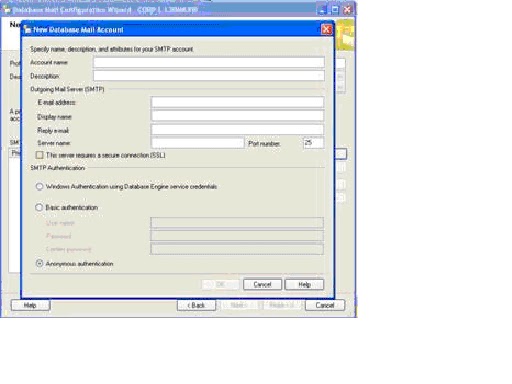
After naming the profile, add the account or accounts the profile should use to send mail. The accounts will be used in order should there be a problem with one or more of them. Here you will also set your authentication mode to the SMTP server.

On this screen, you can specify access to the profiles as appropriate.
Finally, you can specify characteristics of Database Mail such as the retry count, maximum file sizes, prohibited attachment extensions, and the logging level.

Review the summary and click finish. You're ready to send mail.

Examples of Utilizing Database Mail

Now that Database Mail is set up on your SQL Server instance, let's look at a couple examples of utilizing Database Mail.
The following example shows a simple call to the sp_send_dbmail stored procedure. You could put a call like this at the end of an application stored procedure or SQL job to alert on success or failure of the processing for instance.
    EXEC msdb.dbo.sp_send_dbmail
         @profile_name = 'DBMail'
       , @recipients =  'GroupSQLDBA@MyCo.com'
       , @copy_recipients = 'GroupAppSupport@MyCo.com'
       , @from_address = 'DBMail@MyCo.com'
       , @subject = 'Success'
       , @body = 'SQL Job xyz completed successfully';
A more sophisticated example would be executing a query and including the result set as an attachment to the email. Let say you've been concerned with excessive locking in your database, but can't spend all day looking at the locking reports to see when excessive lock waits are occurring. So, you set up a job that runs every 15 minutes and sends you the latest information on all exclusive and intent exclusive locks for instance.
EXEC msdb.dbo.sp_send_dbmail
     @profile_name = 'DBMail'
    ,@recipients = 'GroupSQLDBA@MyCo.com'
    ,@from_address = 'DBMail@MyCo.com'
    ,@query = 'SELECT resource_type, resource_database_id, 
               request_mode, request_session_id 
               FROM sys.dm_tran_locks
               WHERE request_mode IN (''IX'', ''X'')' 
    ,@subject = 'Exclusive Locks'
    ,@attach_query_result_as_file = 1 ;
 
When this executes, the query will be run and the result set will be added as an attachment to the email message. Now you can look through your emails for trends in locking in one or more of your databases and investigate further if need be.

Conclusion

Whether for administration or business application, Database Mail is an easy and convenient way to add communication to your SQL processes. With consideration for reliability, security, scalability, and supportability, this solution can be used in shops small and large including those running SQL clusters.

Thursday, 23 December 2010

Greetings for the New Year

An year has passed without realizing your best friend has changed, family has changed, job has changed and your LIFE has changed. We have survived the rough times, bad jobs, disgusting people and even recession during 2010. 


Let me take this opportunity to wish all my blog readers a very successful and hopeful new year 2011


Wednesday, 22 December 2010

Crime

Can Social Crime Be Prevented Through The Imprisonment Of Criminals?
Imprisonment alone can not keep the man away from crime.

Doing crimes is highly dependent on psychological and socio economic factors. Crimes can never be prevented, but they could be minimized. By creating a balance, man can adjust to society, beside this it can also be due to biological reasons. Crimes can happen but through education and environmental changes, these biological factors can be controlled.

As per above statement it is proven that change of thought and feeling of mankind would directly effort upon individual behavior. Therefore we should investigate to the grass root level of this particular problem.

Keeping all the facts in mind, it is worth mentioning that an individual at some point in their life may involve in an offense due to his economical, social and cultural background and offerings too. E.g. the graph drawn below can depict the above facts.


Hence it is obvious that there should be a new method of culturing social and human values among the people who sentence for various criminal acts.

So based on above assumptions please blog your comments...

Tuesday, 21 December 2010

Recipes for the Holiday Season:2

Smoked Paprika Shredded Pork with Orange Fennel Marmalade


Ingredients

1 tablespoon plus 2 teaspoons McCormick® Gourmet Collection Paprika, Smoked  
1 1/2 teaspoons McCormick® Gourmet Collection Cinnamon, Saigon  
1 1/2 teaspoons salt  
1 teaspoon McCormick® Gourmet Collection Black Pepper, Coarse Grind  
1/2 teaspoon McCormick® Gourmet Collection Chili Powder  
1/2 teaspoon McCormick® Gourmet Collection Coriander Seed, Ground  
1/2 teaspoon McCormick® Gourmet Collection Garlic Powder  
1/2 teaspoon McCormick® Gourmet Collection Red Pepper, Ground Cayenne  
3 pounds pork butt or shoulder roast, trimmed  
2 tablespoons olive oil  
Orange Fennel Marmalade  
1 bag (11 ounces) bite-sized bowl-shaped tortilla chips  

Makes 32 (2 appetizer) servings.

Prep Time: 15 minutes
Cook Time: 2 hours 30 minutes


Nutritional Information for 1 serving
Calories: 128
Sodium: 192mg
Fat: 8g
Carbohydrates: 6g
Cholesterol: 26mg
Fiber: 0g
Protein: 8g 

Directions
1. Preheat oven to 325°F. Mix seasonings in small bowl. Rub entire surface of pork with seasoning mixture. 
Place pork in foil-lined roasting pan. Slowly pour oil over pork. Cover tightly with foil. 

2. Roast 2 1/2 hours or until pork is very tender. Cool slightly. Chop and shred pork. Return to liquid in roasting pan; mix well. 

3. While pork is roasting, prepare Orange Fennel Marmalade. Serve shredded pork on tortilla chips. Top each with a small spoonful of marmalade. 

Tips
Test Kitchen Tip: Shredded pork can also be served in hamburger rolls.

Online Password Security Tactics

Recently two more large databases were attacked and compromised, one at the popular Gawker Media sites and the other at McDonald’s. Every time this kind of thing happens (which is FAR too often) it should remind the technical professional to ensure that they secure their systems correctly. If you write software that stores passwords, it should be heavily encrypted, and not human-readable in any storage. I advocate a different store for the login and password, so that if one is compromised, the other is not. I also advocate that you set a bit flag when a user changes their password, and send out a reminder to change passwords if that bit isn’t changed every three or six months. 

But this post is about the *other* side – what to do to secure your own passwords, especially those you use online, either in a cloud service or at a provider. While you’re not in control of these breaches, there are some things you can do to help protect yourself. Most of these are obvious, but they contain a few little twists that make the process easier.

Use Complex Passwords
This is easily stated, and probably one of the most un-heeded piece of advice. There are three main concepts here:
·         Don’t use a dictionary-based word
·         Use mixed case
·         Use punctuation, special characters and so on

So this: password
Isn’t nearly as safe as this: P@ssw03d

Of course, this only helps if the site that stores your password encrypts it. Gawker does, so theoretically if you had the second password you’re in better shape, at least, than the first. Dictionary words are quickly broken, regardless of the encryption, so the more unusual characters you use, and the farther away from the dictionary words you get, the better.

Of course, this doesn’t help, not even a little, if the site stores the passwords in clear text, or the key to their encryption is broken. In that case…

Use a Different Password at Every Site
What? I have hundreds of sites! Are you kidding me? Nope – I’m not. If you use the same password at every site, when a site gets attacked, the attacker will store your name and password value for attacks at other sites. So the only safe thing to do is to use different names or passwords (or both) at each site. Of course, most sites use your e-mail as a username, so you’re kind of hosed there. So even though you have hundreds of sites you visit, you need to have at least a different password at each site.

But it’s easier than you think – if you use an algorithm.

What I’m describing is to pick a “root” password, and then modify that based on the site or purpose. That way, if the site is compromised, you can still use that root password for the other sites.

Let’s take that second password:
P@ssw03d

And now you can append, prepend or intersperse that password with other characters to make it unique to the site. That way you can easily remember the root password, but make it unique to the site. For instance, perhaps you read a lot of information on Gawker – how about these:

P@ssw03dRead
ReadP@ssw03d
PR@esasdw03d

If you have lots of sites, tracking even this can be difficult, so I recommend you use password software such as Password Safe or some other tool to have a secure database of your passwords at each site. DO NOT store this on the web. DO NOT use an Office document (Microsoft or otherwise) that is “encrypted” – the encryption office automation packages use is very trivial, and easily broken. A quick web search for tools to do that should show you how bad a choice this is.

Change Your Password on a Schedule
I know. It’s a real pain. And it doesn’t seem worth it…until your account gets hacked. A quick note here – whenever a site gets hacked (and I find out about it) I change the password at that site immediately (or quit doing business with them) and then change the root password on every site, as quickly as I can.

If you follow the tip above, it’s not as hard. Just add another number, year, month, day, something like that into the mix. It’s not unlike making a Primary Key in an RDBMS.

P@ssw03dRead10242010

Change the site, and then update your password database. I do this about once a month, on the first or last day, during staff meetings. (J)

American Photography: 2010 Images of the Year

Photographs that will amaze you with artistry and astound you with originality.


Howard Schatz and was a runner-up in the Personal Project category. Schatz's photographed Mike Tyson.
Commercial Photography Winner: Scott Serfas
Commercial Photography Runner-up: Catherine Ledner
Architecture Photography Winner: Jim Shoemaker

Architecture Photography Runner-up: Douglas Ljungkvist
Student Photography Winner: Rebecca Poggiali
Student Photography Runner-up: Sean Dufrene
Student Photography Runner-up: Claude LeTien 
Landscape Photography Winner: Cameron Davidson
Extreme Photography Winner: Paul Nicklen
Extreme Photography Runner-up: Brian Bielmann

Personal Project Winner: Howard Schatz
Photojournalism Winner: Jen Judge

LinkWithin

Related Posts Plugin for WordPress, Blogger...